
Data guide · REC CSV Cleaner Pro
How to Batch Clean Multiple CSV Files on Windows
Batch clean CSV and other supported data files on Windows with REC CSV Cleaner Pro using saved schema-aware templates, preflight review, and per-file results.
Quick answer
To batch clean CSV files in REC CSV Cleaner Pro, save a schema-aware cleaning template, open the Batch workspace, add files or a folder, choose an output folder, run preflight, review any import or schema-mapping issues, and then process the ready files.
Why Batch Cleaning Starts With a Saved Template
Batch processing is designed for repeatable data-cleaning work. REC CSV Cleaner Pro therefore uses a saved schema-aware template rather than asking you to rebuild the cleaning workflow for every file in the queue.
The template contains the ordered workflow and the source schema it was authored against. Each queued file can then be checked for compatibility before any transformation runs.
How to Batch Clean Multiple CSV Files on Windows
- 1
Create and save a schema-aware workflow
Build and review the cleaning workflow on a representative source file, then save it as a schema-aware template so the batch processor has both the workflow and its expected source schema.
- 2
Open Batch and select the template
Open the Batch workspace from the application and select the saved schema-aware template you want to apply.
- 3
Add files or a folder
Add individual CSV, TSV, TXT, or XLSX files, or choose a folder. Subfolder discovery is optional and can be enabled when needed.
- 4
Choose the output location
Select the folder where processed files should be written and choose the supported output format for the batch.
- 5
Run preflight
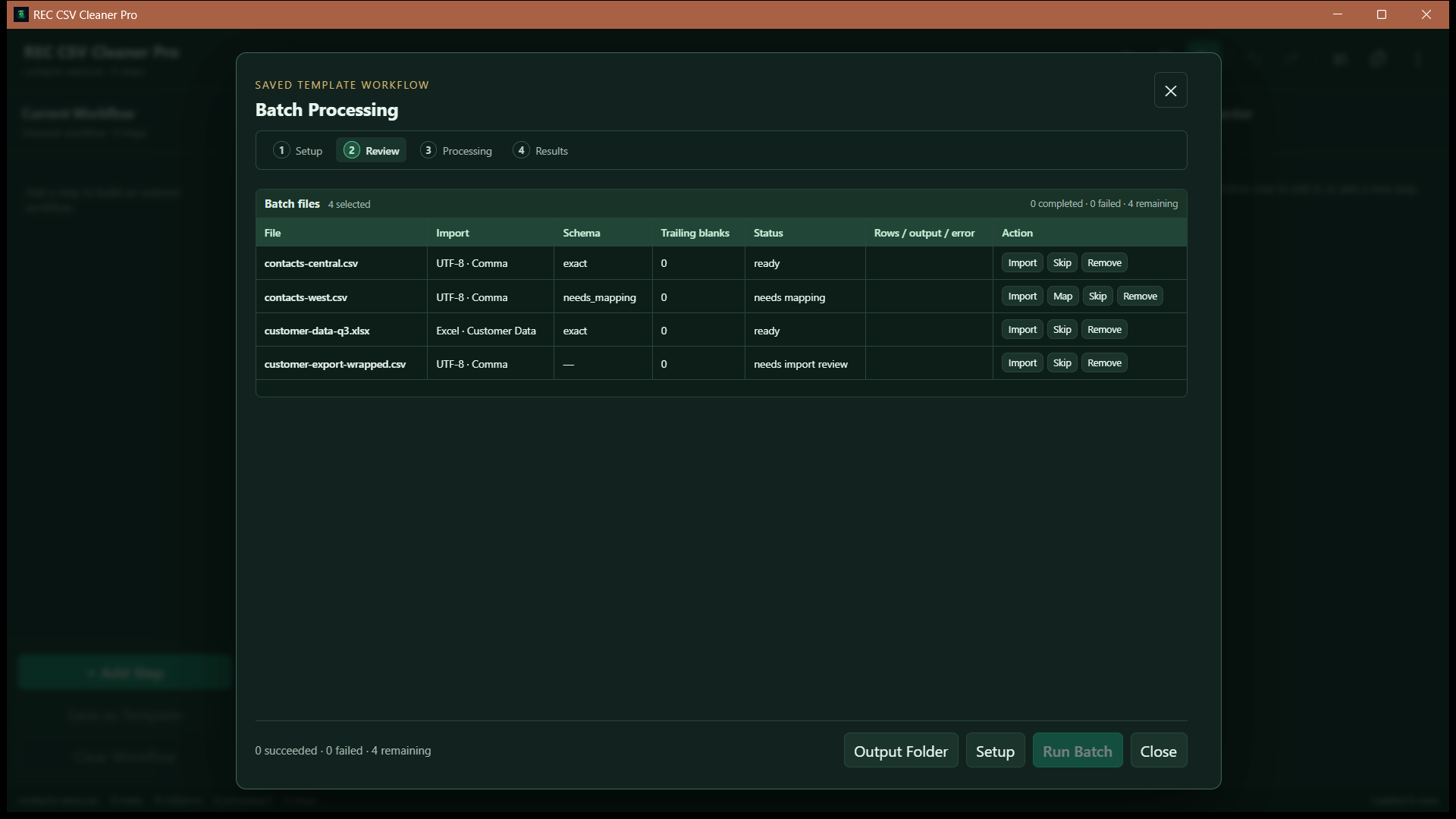
REC CSV Cleaner Pro inspects each file before processing. Files that need import review, schema mapping, or other attention are surfaced before the batch can run.
- 6
Review mappings and compatibility
Confirm non-exact column mappings and resolve files that require import review. Files that are ready can then use the resolved template workflow.
- 7
Run the queue and review results
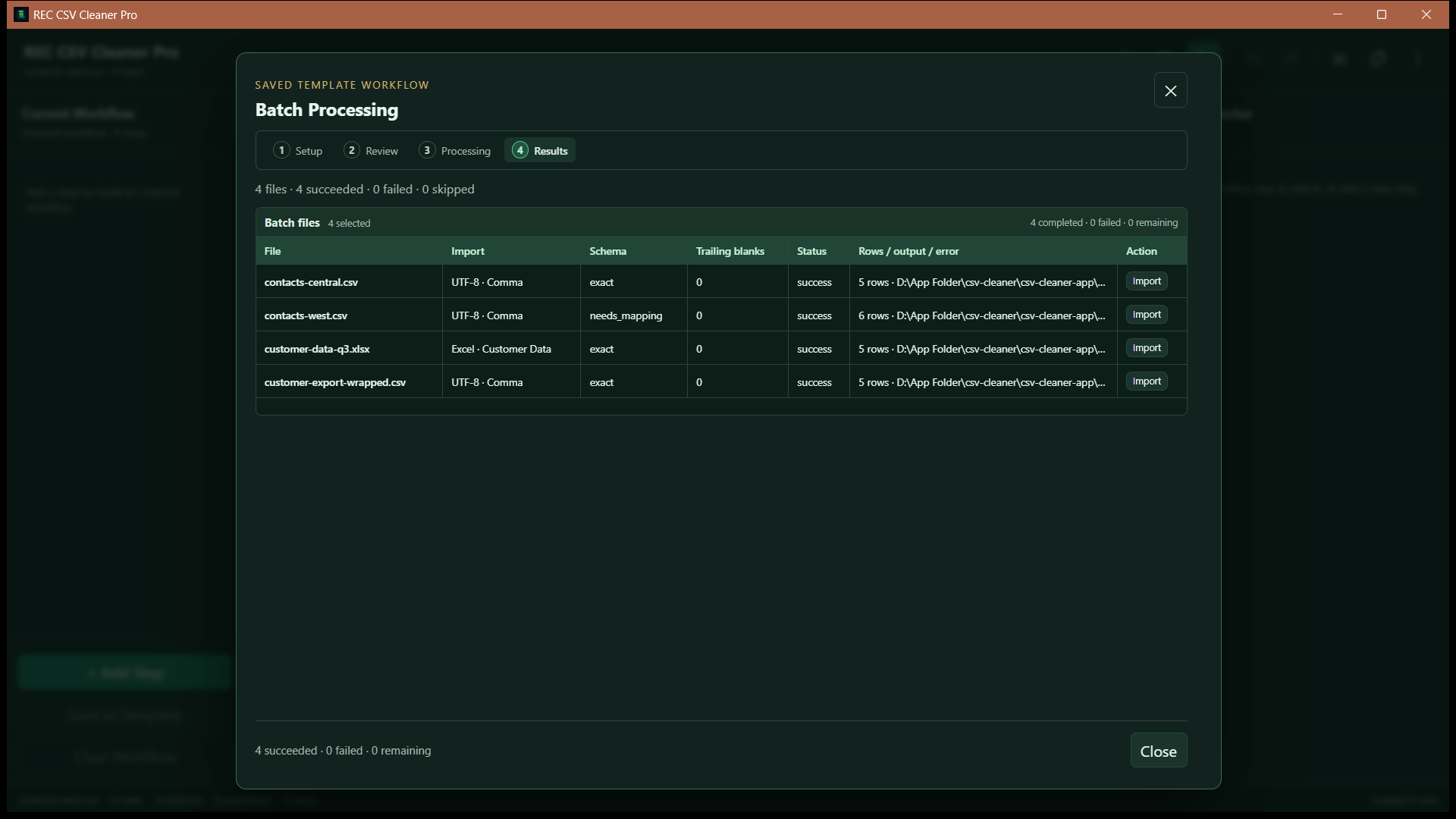
Ready files are processed sequentially. The results view reports success, failure, skipped status, row counts, and output locations per file.
Supported Batch Inputs
The batch file picker supports the same main data-file families used by the application:
CSV
TSV
TXT
XLSX
Preflight Prevents Blind Batch Processing
REC CSV Cleaner Pro inspects queued files before the batch starts. Depending on the file, preflight can mark it ready or require import review, schema mapping, or another compatibility decision.
Ready
The file has compatible import settings and a resolved schema mapping for the saved template.
Review required
The file may need worksheet or import review, column mapping, or another compatibility decision before it can safely enter the processing queue.
Files Do Not Need Perfectly Identical Headers
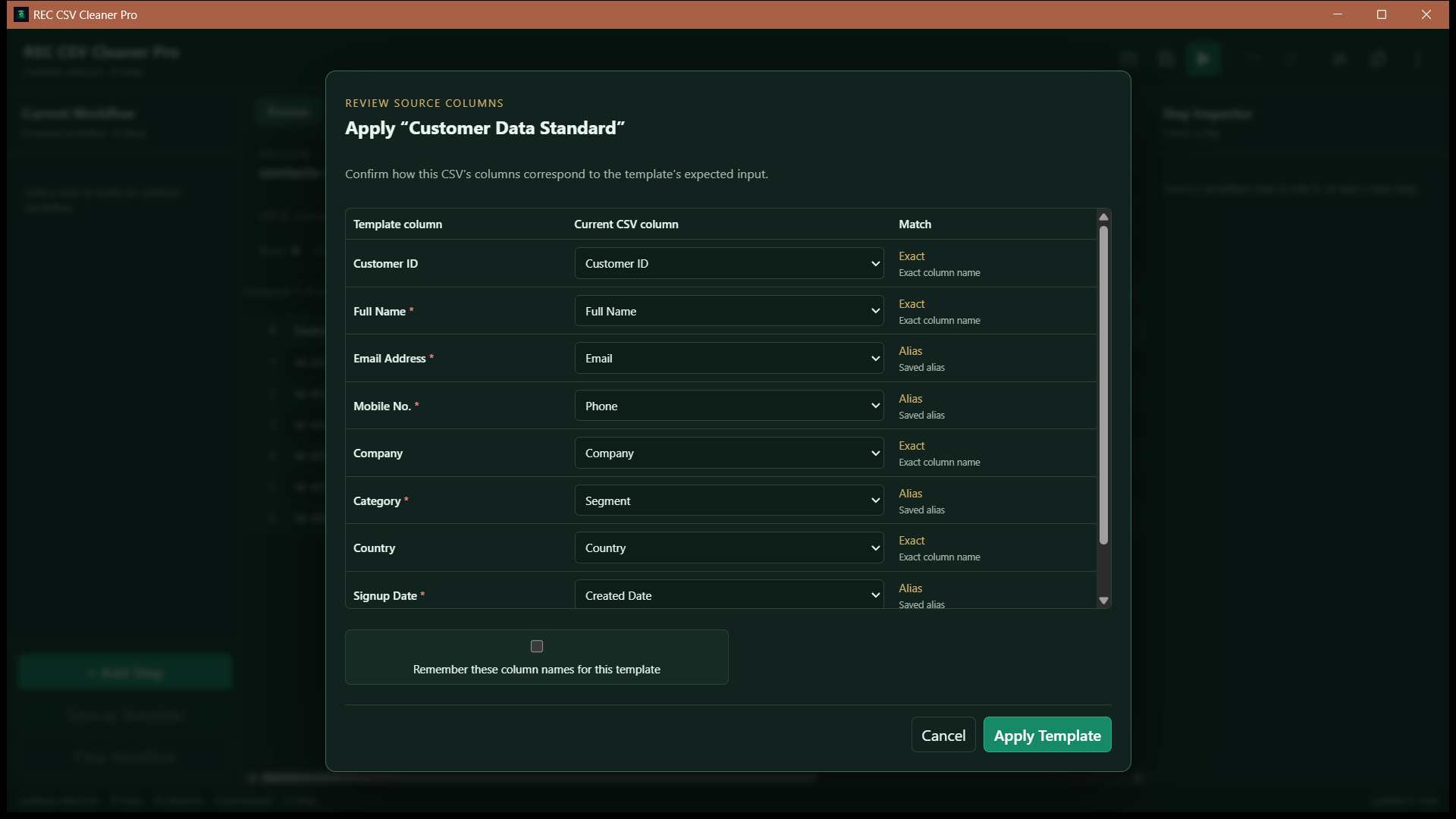
Schema-aware templates let REC CSV Cleaner Pro compare an incoming file with the schema used to create the saved workflow.
Exact matches can proceed directly. Saved aliases, normalized names, and conservative fuzzy suggestions can help resolve renamed columns, while ambiguous mappings are presented for review rather than applied silently.
One Failed File Does Not Have to End the Queue
Ready files are processed sequentially. If one file fails during its workflow, REC CSV Cleaner Pro records the failure for that file and continues to later files in the queue.
Stopping a batch
Stop does not interrupt the current file halfway through its workflow. The current file finishes, and remaining unprocessed files are skipped.
Batch Output Stays Separate From the Source Files
You choose an output folder before processing. REC CSV Cleaner Pro plans separate output files for the ready inputs and supports CSV or Excel workbook output, so the batch workflow does not need to overwrite the original source files.
Build the Workflow Before You Batch It
If you have not created a cleaning workflow yet, start with the guide to cleaning CSV data on Windows. For duplicate handling specifically, see the CSV duplicate-removal guide.
Frequently Asked Questions
Can REC CSV Cleaner Pro clean multiple files in one batch?
Yes. The Batch workspace can queue supported CSV, TSV, TXT, and XLSX files and apply a saved schema-aware workflow to compatible files.
Do all files need identical column names?
No. Schema-aware templates can evaluate exact names, saved aliases, normalized names, and conservative fuzzy suggestions. Non-exact or ambiguous mappings require review before processing.
What happens if one file fails?
The file is marked as failed and later ready files can continue processing. Batch results are tracked per file.
What happens when I stop a running batch?
The current file is allowed to finish. Remaining unprocessed files are then marked as skipped.
Featured application
REC CSV Cleaner Pro
Build controlled data-cleaning workflows for CSV, delimited text, and Excel files with reviewed imports, ordered transformations, data-quality analysis, reusable templates, and batch processing.