
Data guide · REC CSV Cleaner Pro
How to Clean CSV Data on Windows
Learn how to clean CSV data on Windows with REC CSV Cleaner Pro using controlled imports, ordered transformations, data-quality checks, and reviewed exports.
Quick answer
To clean CSV data on Windows with REC CSV Cleaner Pro, import the file with the appropriate structure settings, build an ordered cleaning workflow, preview the transformed result, review data-quality issues, and export the cleaned data when you are satisfied with the result.
Why Treat CSV Cleaning as a Workflow?
Cleaning a CSV often involves more than one correction. Whitespace may need trimming before duplicates are checked, phone numbers may need normalization before values are compared, and unwanted rows may need filtering before the final file is exported.
REC CSV Cleaner Pro treats these operations as an ordered workflow. The steps you select run in the order you configure, making the process easier to review and reuse than a collection of unrelated manual edits.
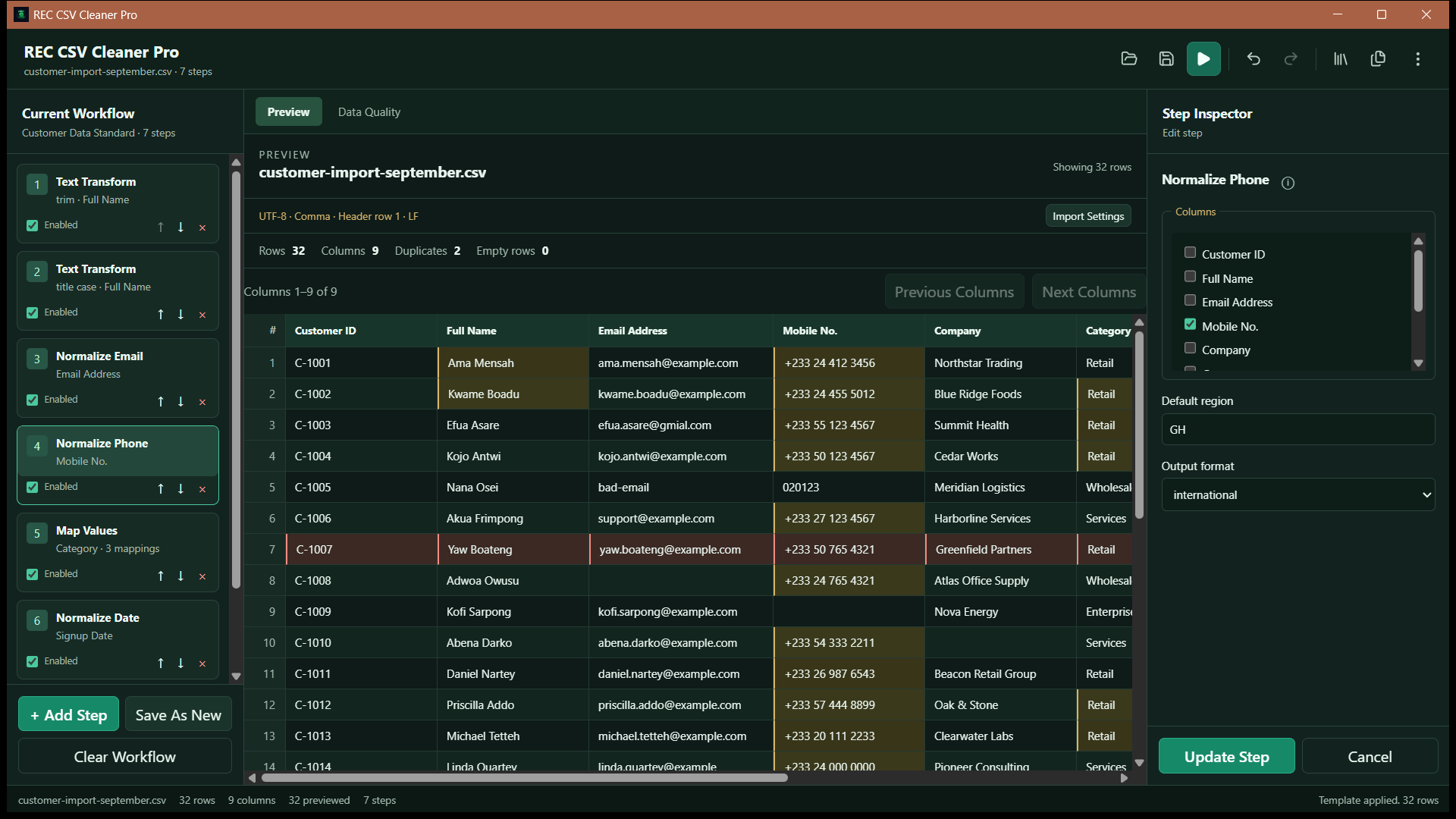
How to Clean CSV Data on Windows
- 1
Import the CSV and review its structure
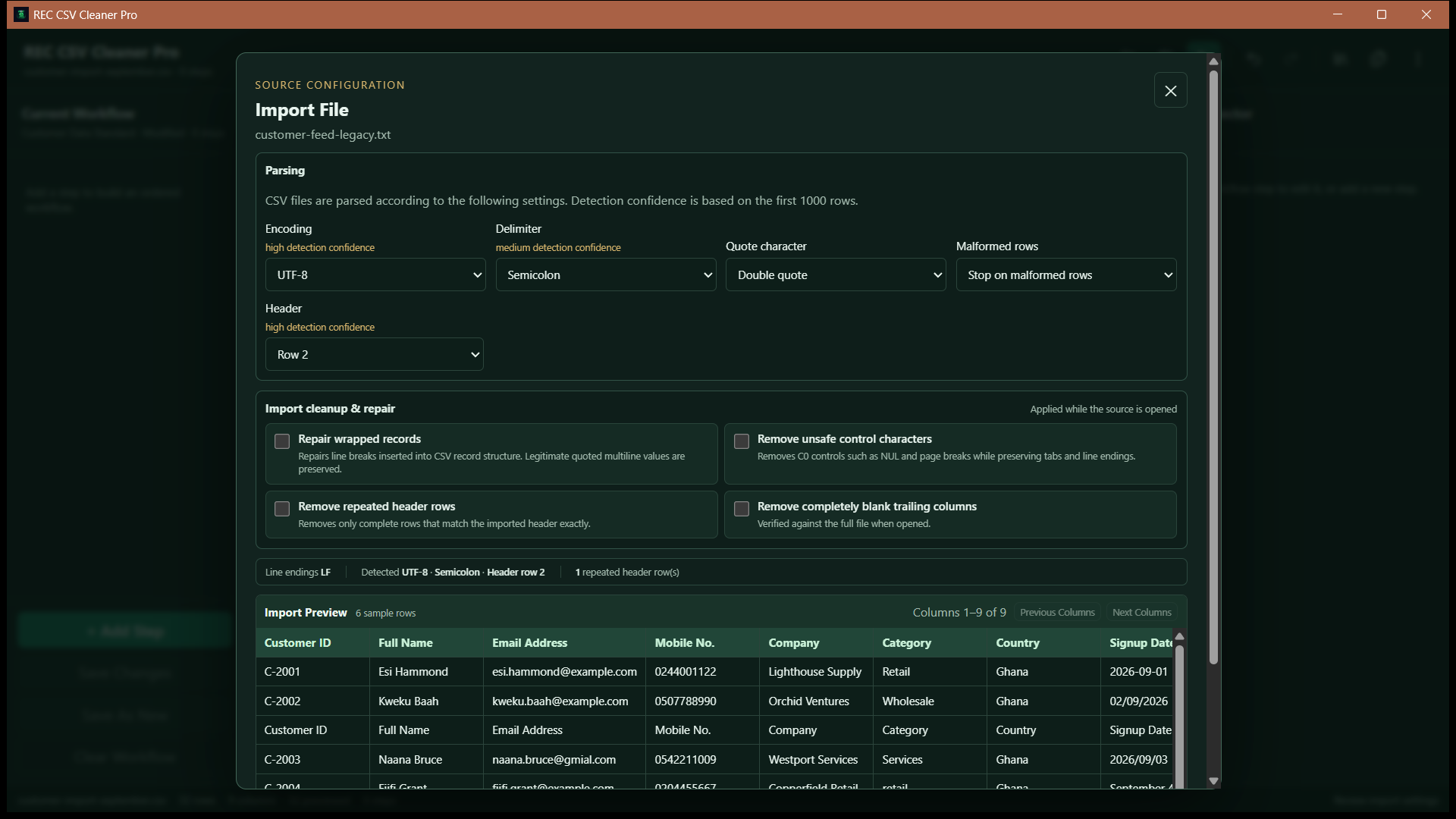
Open the source file in REC CSV Cleaner Pro and review the detected encoding, delimiter, headers, and other import settings before loading the data.
- 2
Inspect the data before changing it
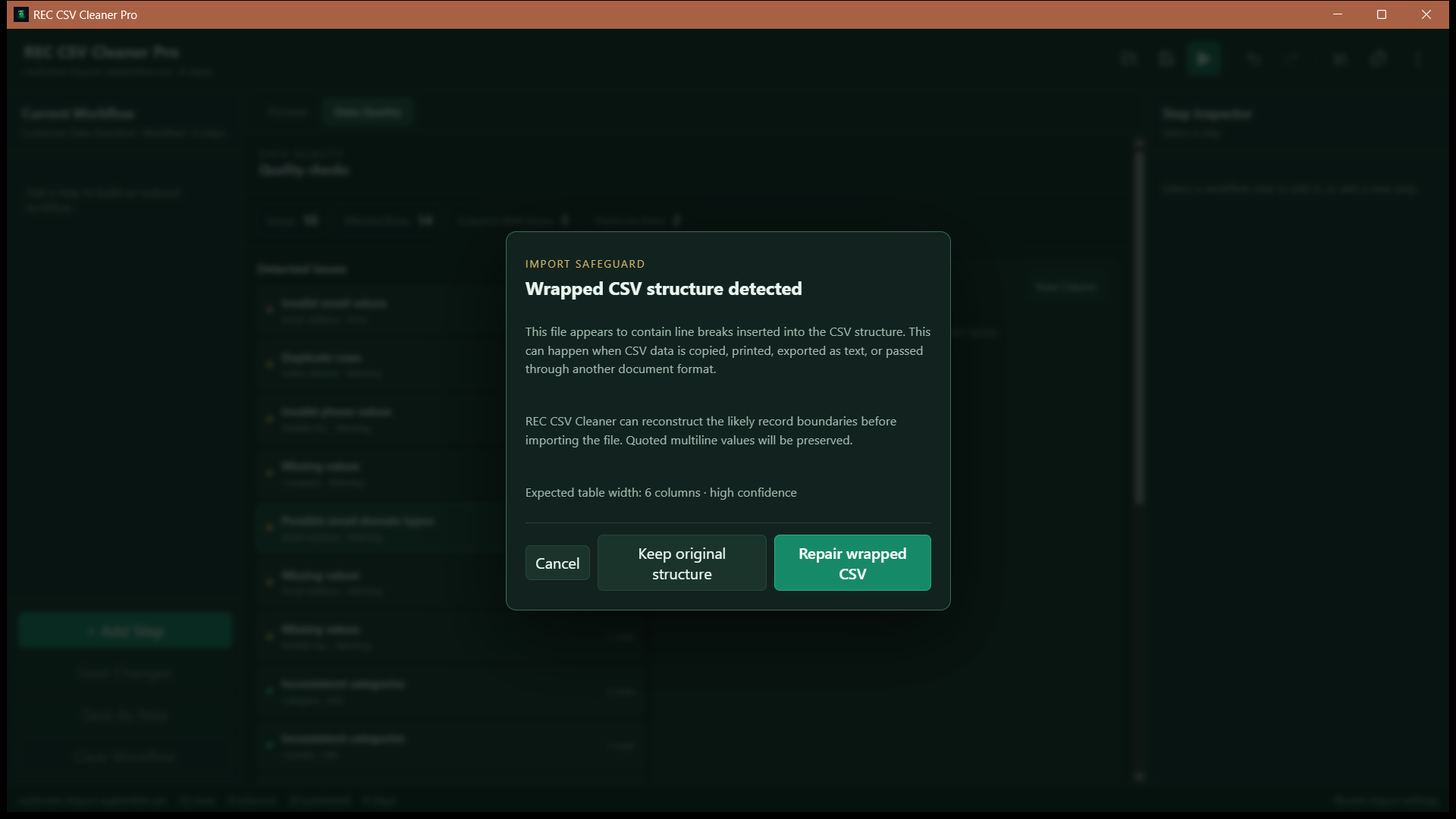
Use the preview and import-review tools to check column structure, malformed rows, repeated headers, control characters, wrapped records, or trailing blank columns that may need attention.
- 3
Build the cleaning workflow
Add the transformations the file needs and arrange them in the order they should run. A workflow can include text cleanup, normalization, filtering, deduplication, column operations, and structured-value cleanup.
- 4
Review the transformed result
REC CSV Cleaner Pro replays the enabled workflow against the imported source data so you can inspect the proposed result before relying on it.
- 5
Check data quality
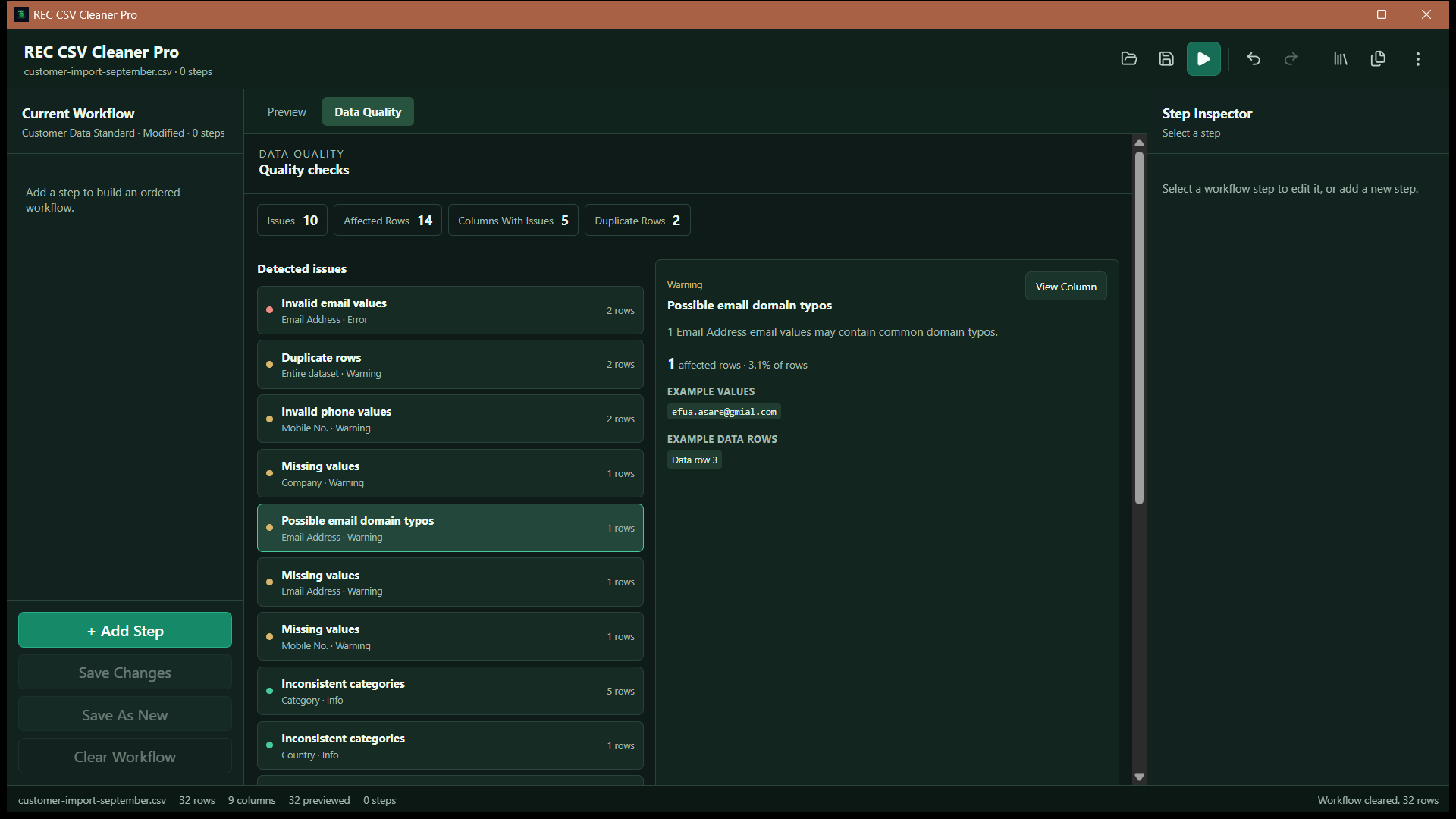
Use the Data Quality Center to review issues such as missing values, duplicate rows, invalid email or phone values, and inconsistent category spellings.
- 6
Export the cleaned data
After reviewing the result, export the cleaned data to a supported CSV or Excel output without exporting REC CSV Cleaner's internal working columns.
Review the Import Before Cleaning
A cleaning workflow is only useful if the file has been interpreted correctly first. REC CSV Cleaner Pro provides import controls for supported CSV, TSV, delimited-text, and Excel files so you can review the structure before transformations begin.
Common Cleaning Operations
Text cleanup
Trim or collapse whitespace, change case, normalize Unicode, remove selected special characters, find and replace text, run regex replacements, map values, or fill empty cells.
Rows
Filter records, remove rows that are empty according to the configured scope, and remove duplicate rows while choosing which matching record to keep.
Columns
Split or merge columns, rename or delete them, duplicate columns, and reorder the visible schema when the output needs a different structure.
Structured values
Normalize supported email, phone, date, and numeric values using explicit transformation rules rather than silently guessing at every ambiguous value.
Check Data Quality Before Exporting
The Data Quality Center analyzes the current transformed data without modifying it. It can surface missing values, duplicate rows, likely invalid email or phone values, inconsistent category spellings, and compact per-column profiles.
Email domain checking is optional
Most cleaning and quality analysis runs locally. Optional mail-domain checking requires internet access and checks the email domain. It does not connect to a mailbox or send a verification message.
Preview Before You Commit to the Result
REC CSV Cleaner Pro is designed around reviewed transformations. Proposed workflow changes are executed before they are committed. If a proposed step fails, the current successful preview and workflow history remain intact instead of being replaced by a broken result.
Reuse the Cleaning Process Later
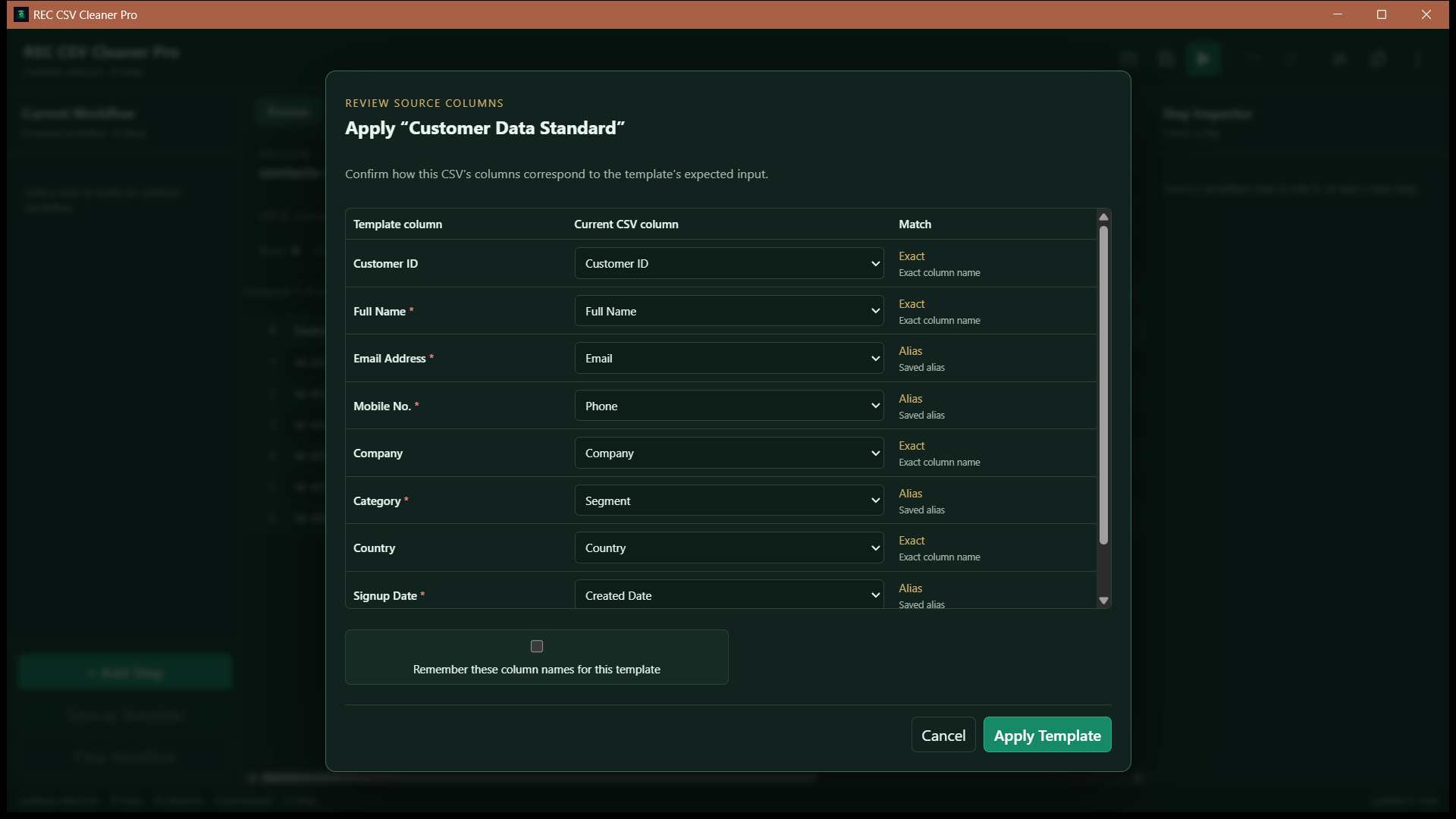
Once a workflow works for a recurring data source, it can be saved as a schema-aware template. The template stores the cleaning steps and the source column schema it was built against.
If a later file changes column names, REC CSV Cleaner Pro can compare exact names, saved aliases, normalized names, and conservative fuzzy suggestions. Ambiguous mappings are reviewed before the workflow runs.
CSV Cleaning vs. One-Click Cleanup
There is no single safe definition of a “clean” CSV. One dataset may need whitespace removed but preserve original phone formatting. Another may require normalized phone values but must keep every duplicate record for audit purposes.
REC CSV Cleaner Pro therefore lets you choose and order the transformations rather than applying an undocumented one-click cleanup to every file.
Related REC CSV Cleaner Pro Workflows
This guide covers the overall cleaning process. If duplicate records are the main problem, read the guide to removing duplicate rows from a CSV. If you need to apply a saved workflow across many files, see the batch CSV cleaning guide.
You can also explore the full REC CSV Cleaner Pro product page.
Frequently Asked Questions
What kinds of CSV problems can REC CSV Cleaner Pro handle?
It supports text cleanup and normalization, find and replace, regex replacement, value mapping, row filtering, empty-row removal, deduplication, column operations, and normalization of structured values such as email, phone, dates, and numbers.
Does REC CSV Cleaner Pro change the file as soon as I add a step?
The application uses a preview-oriented workflow. Proposed workflow changes are executed before they are committed, so a failed step does not replace the current successful preview or history state.
Can I reuse a cleaning workflow later?
Yes. REC CSV Cleaner Pro supports schema-aware saved templates that store the cleaning workflow and the source schema it was created against.
Can REC CSV Cleaner Pro clean Excel files too?
Yes. The application supports controlled import of Excel workbooks as well as CSV, TSV, and other supported delimited-text files.
Featured application
REC CSV Cleaner Pro
Build controlled data-cleaning workflows for CSV, delimited text, and Excel files with reviewed imports, ordered transformations, data-quality analysis, reusable templates, and batch processing.